
ACCOUNT HELP
Request account
deletion.
You can request cancellation of your Kerala Daily Results account from the Android app, or contact the app team if you need help accessing it.
From the Android app
- Open Kerala Daily Results.
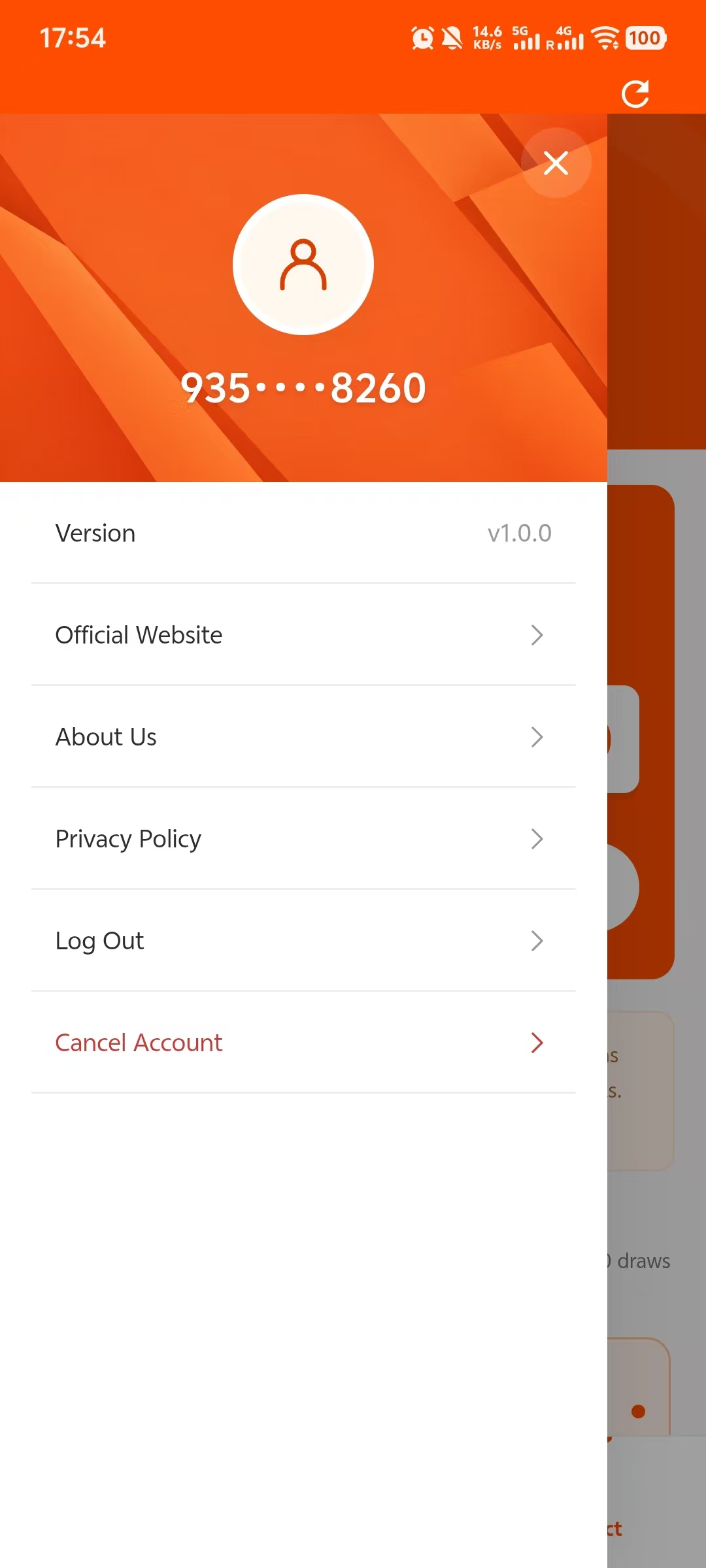
- Open the side menu and sign in to the account you want to cancel.
- Choose Cancel Account near the bottom of the menu shown here.
- Review the confirmation message and confirm your request.
What happens after confirmation?
The app submits the cancellation request to the account service. The confirmation screen states that account data will be cleared after 90 days. You can contact the support inbox below to ask about the status or scope of your request.
If you cannot access your account
Email [email protected] with the subject “Kerala Daily Results account deletion”. Identify the app and explain that you would like to request deletion. The team may ask for information needed to verify that you own the account. Do not include your verification code, password or payment details in the email.
Information associated with your request
An account request concerns the account information associated with the signed-in phone number and the account records held by the service. Device or installation attribution, provider records and any records subject to applicable retention requirements may need separate review. Contact the team if you need a description of the information linked to your account or the records affected by your request.
Logging out and uninstalling
Logging out clears the app’s stored account session. Uninstalling the app removes its local app data under normal Android behavior. Neither action, by itself, submits an account-deletion request to the backend; use Cancel Account or contact support to make that request.
Last updated: October 30, 2026